
Monitor
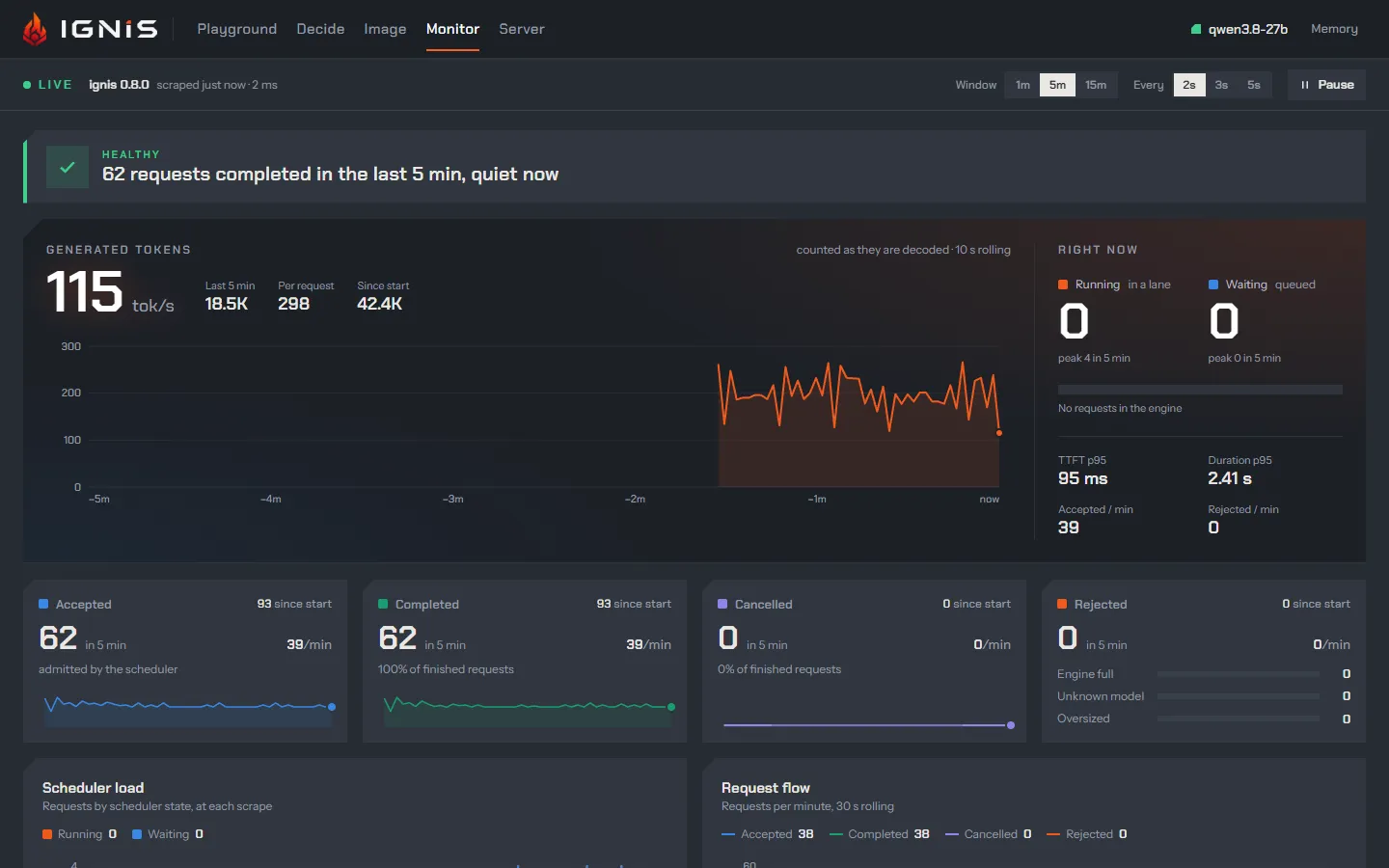
The Monitor is a live dashboard over the server’s Prometheus metrics. The
browser scrapes GET /ui/metrics (the Playground’s copy of the exposition,
behind the same API key as /v1) every 2, 3 or 5 seconds, keeps up to fifteen
minutes of history in memory, and draws it: no Prometheus or Grafana needed.
Every ratio on it is computed in the browser from two series the page shows.
The tab appears only while the server serves metrics (server.metrics, on by
default).
The controls
Section titled “The controls”The bar under the header shows whether the board is Live (or Paused,
Offline, Locked without the key, Late when scrapes stop answering), the
server’s version, and how old the last scrape is. Window (1, 5 or 15
minutes) sets how much history the charts show and what the “last” figures
sum over; Every sets the scrape interval; Pause stops scraping. A
hidden browser tab does not scrape, so an idle page sends no traffic to a
server that scales to zero. Charts read back with the pointer, or with the
arrow keys once focused.
What it shows, top to bottom
Section titled “What it shows, top to bottom”| Panel | What it answers | From |
|---|---|---|
| Server health | A verdict in words, Idle, Healthy, Busy or Saturated, with the reason: requests turned away, waiting for a lane, slow first tokens, evictions |
rejections, scheduler state, evictions, TTFT |
| Generated tokens | The server’s token rate now, over the window, per request and since start | ignis_decoded_tokens_total |
| Right now | Running and waiting requests, their peaks, TTFT and duration p95, accepted and rejected per minute | ignis_scheduler_requests |
| Accepted, Completed, Cancelled, Rejected | Counters with their rate; rejections by reason: engine full, unknown model, oversized | ignis_requests_*_total |
| Scheduler load, Request flow | Running and waiting over time; requests per minute in and out, and how many cancels were loop-guard rewinds | |
| Time to first token, Request duration | p50, p95, p99 and the mean over the window, the histogram and the trend | ignis_request_ttft_seconds, ignis_request_duration_seconds |
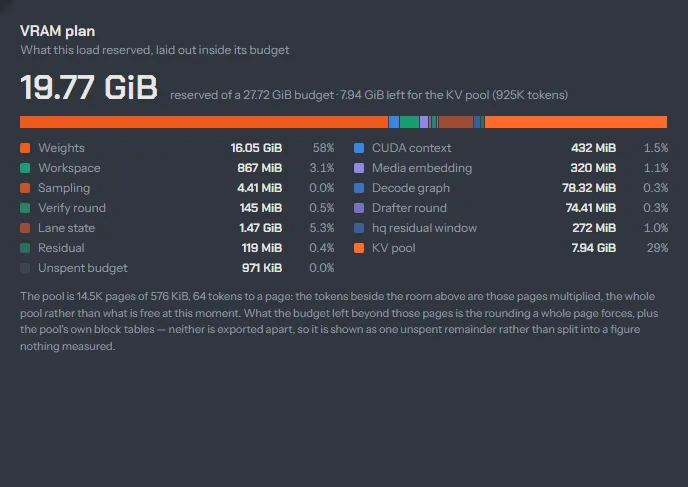
| VRAM plan | What the load reserved, line by line, inside its budget, and what was left for the KV pool | ignis_vram_reserved_bytes, ignis_vram_budget_bytes |
| In use now | KV pool pages, the KV-RAM arena, KV-disk and retained slots, each against its bound | pool, arena and slot gauges |
| Retained state | Tokens reused, hits, misses, spills, discards and restores, per tier and kind | ignis_retained_* |
| Speculation | Acceptance, tokens per verify round, how often each draft position is kept | ignis_speculative_* |
| Reasoning | Turns the loop guard saw loop, tokens taken back, closes the thinking budget forced | ignis_loop_guard_*, ignis_thinking_forced_closes_total |
| Image jobs | Jobs, pictures made, their duration and the time in each phase | ignis_image_* |
| Transcriptions | Transcriptions that ended and how, the audio they covered, the median wait from commit, sessions open and the queue | ignis_speech_* |
| Expert residency | Flash-Next’s expert cache: hit rates, copies from host RAM, stalls | ignis_expert_* |
| Prefix reuse | Prompt tokens skipped through a sibling’s prefix | ignis_prefix_reused_tokens_total |
| Evictions | What left each tier, VRAM, RAM and disk, and whether the work survived | eviction and spill counters |
| Scraper | This browser’s own polling: interval, round trip, history, restarts seen | |
| All series | Every sample of the last scrape as a table, and the raw exposition |
Panels appear when their series do: Speculation after the first verify round, Reasoning once the loop guard has watched a request, Image jobs after the image model ran one, Transcriptions after the speech model was first asked, Expert residency on a Flash-Next load. Every metric, with when it appears: metrics.
The VRAM plan
Section titled “The VRAM plan”The plan panel is the server’s load-time plan drawn as a bar: weights,
workspace, lane state, the verify and drafter rounds, the decode graph, the
CUDA context, and the KV pool that takes the rest, with its pages and tokens.
It is the same plan the ignis.runtime.vram_plan log line prints at load,
and why it is decided up front is in
Every byte planned at load.
In the chat
Section titled “In the chat”While the chat is open, a chip in the header shows how many requests are running and the server’s token rate from the same scrape; it opens the Monitor.