
Transcribe
The Transcribe view writes a whole conversation down: a meeting in the room, a call on this computer, or a recording. What it hears becomes a transcript, its utterances in order, each with its time, its speaker and its text. You can rename and correct the speakers and edit the text while it listens, have the text model write its notes, then copy the transcript, download it, or open it in a new chat. It uses the server’s speech model and, for the speakers, its diarizer.
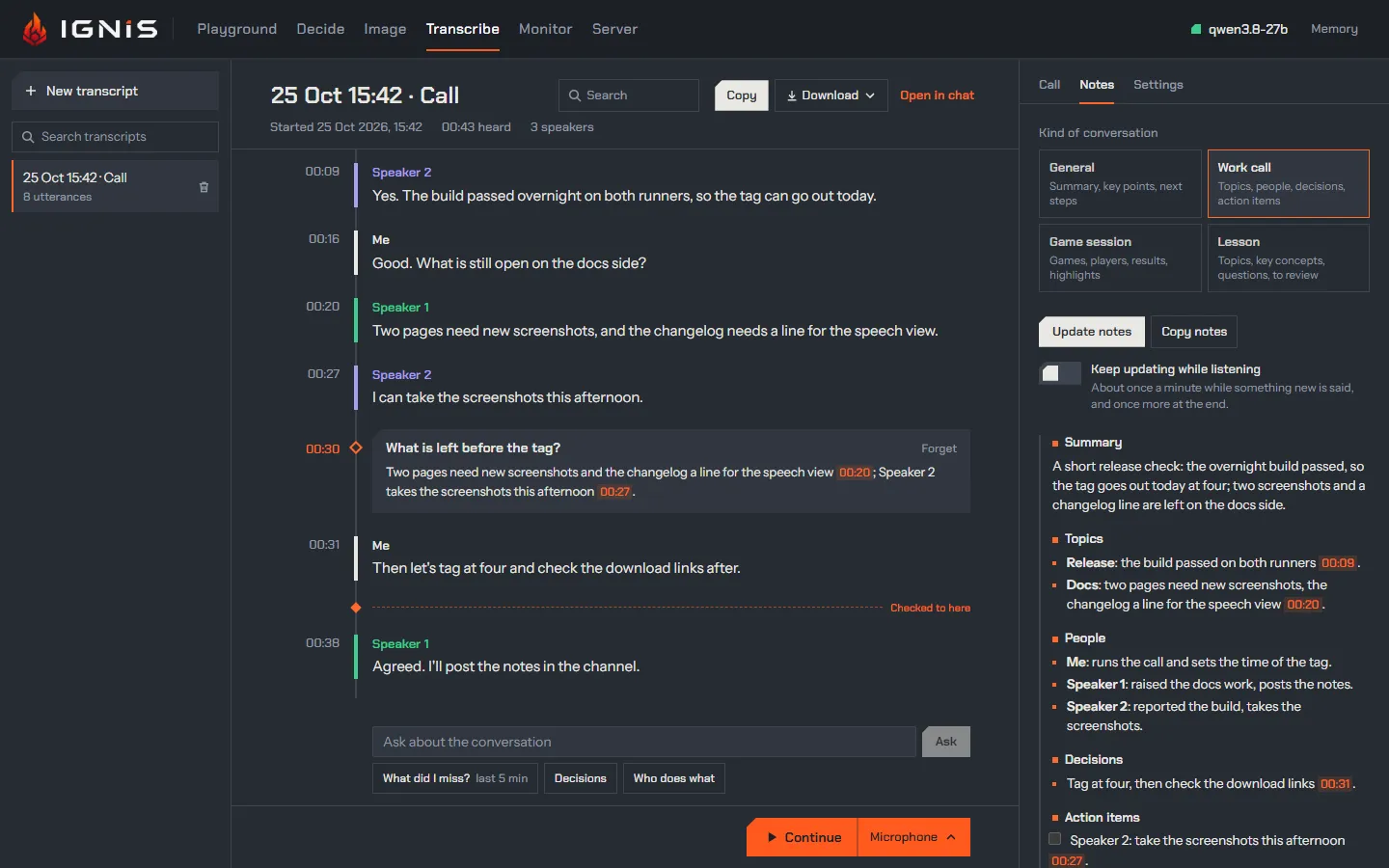
It is laid out like the other views: the transcripts on the left; the one open in the middle, its title and exports above it and its deck at the foot; and on the right three tabs: Call, what the transcription is told and who speaks; Notes; and Settings, the view’s own. Below 1024 px wide the side columns open from the header as drawers (Call opens the right one).
Listening
Section titled “Listening”Start stands in the deck at the foot, with what it listens to beside it: press that to pick from its menu (this browser keeps the pick).
- Microphone: a conversation in the room, one session on the server.
- Call: the microphone plus one tab, window or screen the browser offers to share. Tick the browser’s Share audio: a tab shares its own sound; the whole screen shares the system’s sound (on Windows, every application’s, mixed); a window shares its own where the browser can (Chrome 141 and later). The microphone and the shared audio are two sessions, never mixed: the microphone’s voice is Me, and the shared audio’s voices are its speakers. Through speakers, the far voices reach the microphone too: Hold my mic while they speak in Settings, on unless you turn it off (this browser keeps the choice, and a change holds at once), sends the microphone’s session silence while the shared audio is loud and for half a second after, so those voices are never transcribed as Me; the strip marks the mic held meanwhile. What you say over the other side is lost then, so with headphones turn it off. The browser’s own Stop sharing stops the listening.
- File: a recording you pick (wav, mp3, ogg, m4a, webm, an mp4’s audio: whatever the browser decodes). The browser decodes it to 16 kHz mono and sends it faster than real time, with a progress bar and the time left. It stays ahead of its transcript by at most the File pace in Settings (45, 60 or 90 seconds of audio not yet transcribed; 60 unless you pick another, kept by this browser); past that it sends an utterance still under way at real time, since only more audio can end it, and waits while utterances wait for their text. A pause in it longer than the pace is not held against it. With speakers, an utterance’s text waits for up to 30 s of the audio after it, so a lower pace runs nearer real time.
While it listens, the deck is a dark strip with a level meter for each source
(Mic, and Call on a call), the time, Pause and Stop; the header shows
the listening and its time from every view, beside the model’s status, and a
press on it comes back here. Pause lets the microphone go (a call keeps its pick, so
Resume needs no new one) and ends the utterance under way; Resume goes
on, on a new session if the server closed the old one while it was paused
(after server.socket_idle_close, 300 s). Stop waits until the server
has read the last audio sent, ends the utterance under way, waits while its
text comes (Finishing the last words; with speakers
the server waits for the diarizer, up to about 2.3 s live and 30 s for a file)
and closes; Stop now closes at once.
A transcript that already holds utterances shows Continue in place of Start: the new listening appends to it, and its times go on from where it stopped.
Where an utterance ends
Section titled “Where an utterance ends”An utterance ends at a silence of Utterance ends after in Settings: 0.5, 1, 1.5 or 2 s, 1.5 s unless you pick another (this browser keeps it). A change holds at once, in a listening too. The server’s own default, 0.5 s, cuts a speaker at every breath into pieces of a second or two, and the model guesses the language of each piece on its own; a longer silence keeps a phrase whole. With Speakers on, a change of voice ends an utterance whatever the silence.
The text
Section titled “The text”Each utterance under way is drawn at the foot of the transcript as it is heard, the settled words in full colour and the last ones the model may still change light, as a dictation draws them; it settles when its text is complete. With speakers on, the server fixes no text before an utterance ends, so the whole utterance under way stays light until then.
The view follows the newest words. Scroll up to read, and it stays where you are; Jump to live brings it back.
The Context in the Call tab is what the transcription is told, and each
transcript keeps its own. Add or Edit opens a draft, framed in orange:
the Languages, a Topic, the Terms to spell right (names, products, jargon; Enter or a
comma adds one) and Anything else. Nothing is sent while you type:
Apply keeps it with the transcript and, while listening, tells the
sessions in one update, which holds from the next utterance; a Start applies a
draft left open. Applied, it reads as a record with the time it was applied
and about how much of the server’s context it takes: the server reads
speech.context_max_tokens of it (512 unless set) and, past that, keeps the
last. A speaker’s name you give joins the terms. An Apply changes only what the
draft changed, so a suggestion accepted while it was open stays. On a pause
with no one speaking, the model can write a line of the context in place of
what it heard; the server takes such a copy for no speech, so it leaves no
utterance (the measurement).
A transcript never started is told your default, once you save one: Save as default, beside an applied context or in a draft, keeps it in this browser for every new transcript; Clear the default, in an empty draft, drops it. The first Start of a transcript whose context you have neither applied nor opened asks first, your default too: over Start the deck says what the call would be told, with Use the context of the latest transcript told something else, which opens it as a draft, and Edit the context, and the Call tab frames the context in orange. Start anyway goes on. A draft left open asks nothing: the Start applies it.
The Languages are Detect unless you pick Force one:
- Detect: the model detects each utterance’s language, and the ones you
list go first into the context as a hint (
Languages: Italian.). Measured on read Italian cut into pieces of 1 to 2.5 s, the hint took the shortest from 91 % to 100 % heard as Italian, as forcing does, while English speech under an Italian hint stayed English text (the measurement). Two languages listed help as much on Italian, but one English clip in thirty came out translated into Italian. - Force one: every utterance is transcribed as that language (the
session’s
language): measured, seven English clips in thirty came out translated into Italian under Italian forced. For a conversation in one language whose short utterances still come out in another.
Suggestions
Section titled “Suggestions”While a listening goes on, the Call tab suggests what the transcription could be told, and a bell beside the tabs counts what waits:
- the languages, from what the server says of each utterance once six are in: Detect the one spoken, as a hint, when the others came only on short utterances (“2 short utterances came out as Thai and Hindi, among 9 in Italian”), or the ones spoken when each holds its share. It never suggests Force one: measured, the hint fixes those utterances as well and does not translate what is said in another language;
- a topic, while none is told, a title, while the listening’s own one stands, and terms to spell right: the text model reads the transcript once six utterances are in, then about every minute and a half while something new was said, and once more when the listening ends. It checks the names it heard first, so a misheard name comes back spelled right (“Postgress” as PostgreSQL);
- fixes: a name, product or term the speech model misheard,
“Postgress” is PostgreSQL, in every utterance that holds it as a word of its own. Fix replaces it there, marks it with a dotted orange line, and makes the right spelling a term, so the next utterances get it right from the start; Undo fix under an utterance puts its text back as it was heard (an edit made since goes with it). A fix you accepted follows the same misheard words into the utterances heard after it, with no model: they come as a card of their own, or, with Always, are fixed as they come; an utterance you undid and a fix you dismissed stay as they are. Only names and terms: the model is told never to rephrase.
Each waits as a card: its verb (Apply, Use, Rename, Add them, Fix) accepts it, Dismiss drops it for good, and Always accepts it and every later suggestion of its kind in this transcript without asking. A term you do not want is taken out with its cross, and is never suggested again. Accepting changes the context, which is applied at once, or the title; nothing else. Suggest now reads the transcript on the spot, a listening or not. Suggest while listening in Settings, on unless you turn it off (this browser keeps the choice), stops the suggestions while listening; the text model’s go to the model loaded, as the notes do.
A dashed orange line across the time spine, Checked to here, shows where the text model’s last look stopped reading, at the foot once it read everything; while listening, with Suggest while listening on, it says when the next may come (“next check in about 45 s”, or “once more is said”: a look waits for three new utterances). What is below it has not been checked yet: a Rewrite there says so, since the next look might fix it.
Times and speakers
Section titled “Times and speakers”Times run from the start of the transcript: mm:ss, and h:mm:ss past an
hour. An utterance starts where its speech starts and ends at the silence, the
change of speaker or the length limit that ended it. A live transcript shows
when it started; a paused listening’s time stands still.
With Speakers on in Settings (the default; this browser keeps it, and the
next Start reads it), the diarizer tells the voices apart and
the view names them Speaker 1, 2… in the order they first speak, each in a
hue of its own along the time spine. Up to eight voices are told apart. On a
call the microphone’s utterances are Me, and the shared audio’s are its
speakers, or Others with Speakers off. With Speakers off, the room and a
file have no labels. When the server has no diarizer to offer, the toggle is
struck and says why under it: turned off (diarizer.model = off), its files missing (with the ignis-server model download command), or
the server’s reason. A diarizer the server refuses or loses during a listening
turns Speakers off for it, with its reason, and the listening goes on.
A new session numbers its voices afresh: after a Resume on a new session or a Continue, a voice that comes back is a new speaker until you merge it into the one it was. The Speakers panel says so once a transcript holds more than one session.
Correcting them
Section titled “Correcting them”Every correction is the page’s, and nothing goes back to the server:
- Rename a speaker in the Call tab’s Speakers: every one of their utterances, past and future, takes the name.
- Move an utterance: its speaker is a menu; pick another speaker, or New speaker.
- Merge two speakers: Merge into on a speaker’s row. One name is left, and the future utterances of either take it.
- Rewrite an utterance the speech model misheard: click its text, then Rewrite. The text model rebuilds what was said from the context, the conversation around it and how the misheard words sound, thinking a little (about two seconds), and proposes it under the utterance with the words it adds underlined and those it drops struck through: Accept takes it, keeping the text as heard behind Undo fix; Discard leaves it.
- Delete an utterance: click its text, then Delete. For a few seconds Undo at the foot of the transcript, which takes the focus and waits while pointed at, puts the last one deleted back where it was.
- Split an utterance where the diarizer missed a change: click its text,
put the cursor where the second speaker starts, and pick the second half’s
speaker in Split at the cursor, the rest to…. No audio is kept, so the
time of the split is guessed from the characters and marked
~.
The text of every completed utterance is editable: click it, even while listening. What you edit, and what a fix put in, is what the exports, the notes and Open in chat carry.
Searching
Section titled “Searching”Search beside the title (or Ctrl+F while the view shows) lights every occurrence in the transcript open, whatever the case and the accents (“perche” finds “perché”), the one it stands on in orange, and says where it is, “3 of 12”. Enter or the arrows beside it go to the next, Shift+Enter or the up arrow to the previous, Escape clears; the view stops following the newest words meanwhile.
Search transcripts above the list keeps the transcripts that hold the query, in their text or their title, each with its count of matches; opening one carries the query into its own search.
The transcript
Section titled “The transcript”Each transcript is kept in this browser as each utterance completes, with its text, times, speakers and corrections, and never its audio (Sessions and storage). Its title is the date, the time and the source, “25 Oct 15:42 · Call” (a file’s name for a file); click it to rename it. New transcript starts another; the bin on a row deletes one, except the one listening. A reload keeps every completed utterance and ends the listening; so does a lost connection.
Out of the view
Section titled “Out of the view”Beside the title, Copy puts it on the clipboard, and Download writes it as:
| Format | Each utterance |
|---|---|
.txt (and Copy) |
[mm:ss] Speaker: text, one line each |
.md |
**Speaker** (mm:ss): text, after the title and the start |
.srt |
a numbered cue from its start to its end, Speaker: text |
.vtt |
a cue from its start to its end, <v Speaker>text |
Open in chat opens a new chat with the transcript as Markdown in its prompt box. Nothing is sent until you press Send: ask for a summary, the decisions, the action items.
Send to workspace asks which workspace, a new one named after the transcript or one you already have, and adds the transcript to it as a Markdown file, the very text the .md download writes, so the model can read it in a chat whose workspace it is. A name the workspace already holds gets a number, as any file you add does. The transcript stays here as it was; the file is a copy, and a later correction does not reach it until you send again.
Asking about it
Section titled “Asking about it”The field at the foot of the transcript, over the deck, asks the text model
about it, while listening too. What did I miss? asks what was said in the last five minutes,
Decisions what was decided and what is still open, Who does what who
agreed to do what, each answered in the conversation’s language; a question you
type is answered in its own. Come back to the page after a minute or more away
from it (another tab, another window) while it listens, and What did I
miss? reads from what you had last seen instead, its button saying since
when. While a text model serves, a time on the left of the transcript picks
the moment it reads from; press it again, or Escape, for the last five
minutes. Pointing at the button
colours, on the time spine, what it will read; once asked, it reads the last
five minutes again. The answer streams in on the time spine where you
asked, after the last utterance it read, that moment’s time in orange beside
it, and stays there while the conversation goes on under it; Forget drops
one. It reads the transcript alone, so a word heard wrong stays wrong in it.
Answers are not searched, nor exported. A moment named as [mm:ss], in an
answer or in the notes, is a link: click it and the transcript shows that
utterance, lit for a moment.
The Notes tab has the text model loaded read the transcript and write its notes. Pick the kind of conversation first; each asks for its own sections:
| Kind | Sections |
|---|---|
| General | Summary, Key points, Next steps |
| Work call | Summary, Topics, People, Decisions, Action items, Open questions |
| Game session | Games, Players, Results, Highlights |
| Lesson | Topics, Key concepts, Questions, To review |
Write notes sends the transcript as it stands, and the notes stream in
under those headings, as written above; the text under them is in the
transcript’s language, a moment is pointed at as [mm:ss], and a section with
nothing in it is a dash. Update notes writes them again from the whole
transcript, so a correction holds; Stop leaves the notes there were. The
line under them says when they were written, from how many utterances, and how
many came since. Copy notes puts them on the clipboard as Markdown. Each
transcript keeps its notes and its kind; a new one starts at the kind picked
last (this browser keeps it).
Keep updating while listening, off unless you turn it on (this browser keeps the choice), writes them by itself while a listening goes on: the first once three utterances are in, then about once a minute while something new is said, and once more when the listening ends. Picking another kind meanwhile writes them again straight away.
Nothing goes to the model before a press or the switch. The notes go to the
model loaded and name none, so they never switch models: with the image model
loaded, or none serving, the tab says so and writes nothing. Each writing is a
chat completion on an agent’s lane (class: "agent"), thinking off, that waits
while every lane is taken; the transcript is its user message after the title,
so a later writing starts with the text the last one sent, which the server can
reuse. A transcript too
long for the model’s context is sent from where its tail fits, and the line
says from when.
While it listens
Section titled “While it listens”The microphones of the other views are struck and say Listening in Transcribe.: they open no second session. A dictation under way when a listening starts ends as it does when another mic is pressed, and its text lands in its field.
The line under the deck follows along:
| When | It says |
|---|---|
| before a call | Use headphones on a call: through speakers, the far voices reach the microphone and are transcribed twice. |
| every session taken | Speech is busy: every session is taken. Trying again in N s. |
| refused again | The listening still could not open: speech is busy. Press Start to try again. |
| the connection closed | Listening stopped: the connection to the server closed. Every completed utterance is kept. |
| nothing shared, or no audio shared | Nothing was shared: … / The pick shares no audio: … |
| an utterance failed | An utterance could not be transcribed: the server’s reason. |
| a file’s end | Transcribed name. |
| the server is up but the socket never opened | Listening could not start: the server is up, but this address does not carry WebSockets. |
An unavailable speech model, a microphone the browser blocks and a page served outside https or localhost say what they say for a dictation; a file needs no microphone, so it starts outside https too.
What a listening sends
Section titled “What a listening sends”Each source is one session on GET /v1/realtime?intent=transcription
(Realtime transcription), opened at Start
and closed at Stop; a call takes two of the server’s speech.max_sessions (4).
Each asks for:
- the server’s turn detection with the view’s silence:
turn_detection: {type: "server_vad", silence_duration_ms: <the setting>}, the threshold and the padding the server’s (speech.vad_*), and every commit is an utterance; a change of the setting is asession.updateof the turn detection; - 16-bit PCM at 16 kHz, 100 ms of audio at a time (a file’s faster);
- the provisional tail (
session.ignis.provisional_tail: true); - the speakers, with Speakers on:
session.ignis.diarization: "live", or"file"for a file, the diarizer’s geometry for audio sent faster than real time. A call’s microphone never asks: it is Me; - each utterance’s language (
session.ignis.item_language: true), which the language suggestion reads; a server older than it refuses the key, and the session is configured again without it; - what it is told: the topic and anything else as the transcription’s
prompt, the terms and the speakers’ names you gave as itskeywords, and asession.updateof them at an Apply or a rename.
It sends no session.ignis.max_utterance_seconds, so the server’s length guard
(speech.max_utterance_seconds, 120 s) cuts a long utterance at its weakest
pause. A file’s append the server refuses for its queue limit
(ignis_audio_queue_full) is sent again from there a moment later, after
the file’s end too.
Cost. A microphone left open sends silence, so its session never idles, and with speakers the diarizer reads all of it: measured at about a fifth of a ten-core desktop CPU, more on four cores. Pause stops it. Listenings of hours have not been measured.
Read more
Section titled “Read more”- Realtime transcription: the events behind the view, the speakers and the queue.
- Speech configuration: the speech model, the diarizer, the length guard.
- Chat: dictating into a prompt.