
Server
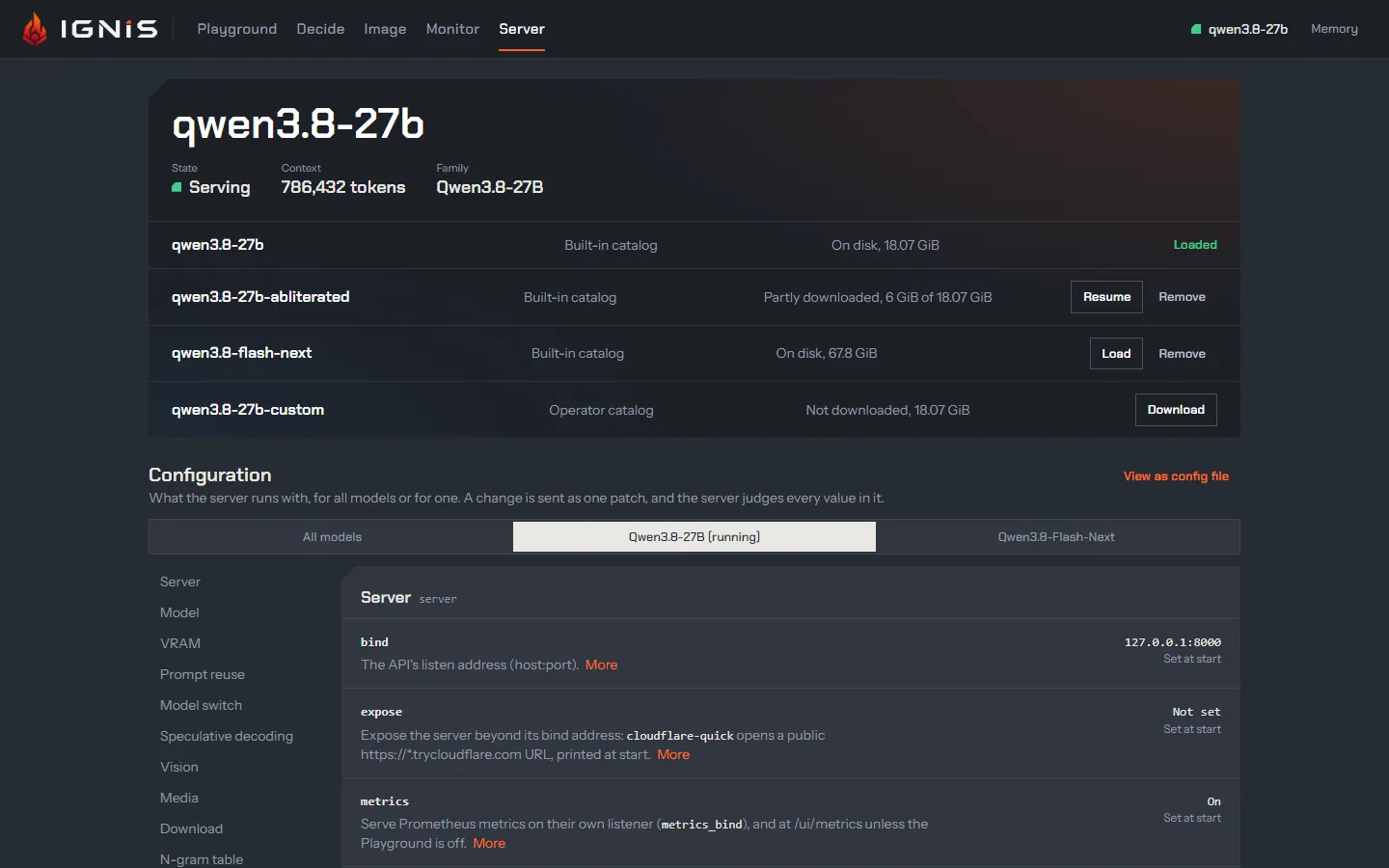
The Server view changes the running server from the page. At the top, the
model band: what is loaded, its state and context, and every model the
server knows. Below it, the configuration: every field the server runs
with, as a form. Applying a change sends one PATCH /v1/config; the server
judges every value, applies what it can live, and reloads the model only for
a field that needs it.
The model band
Section titled “The model band”The headline is the loaded model’s id with its State (Serving,
Switching, Loading, Unloaded, Not serving), its Context in tokens
and its Family. Beside them, the models loaded beside it rather than
switched to: Speech, the
speech model’s id, and Diarizer, the
model that gives a live transcript its
speakers, with whether it is
Loaded (the first session that asks for speakers loads it, the speech
model’s idle unload frees it) or Not loaded. Either one that cannot serve
reads Unavailable, with the server’s reason under the figures: turned off,
or its files missing, with the ignis-server model download command that
fetches them. Under it, one row per model the server’s catalog knows
(GET /v1/models/catalog): where the entry comes from (the built-in catalog,
an operator catalog, or a known model), how
much of it is on disk, and its action:
- Loaded for the model that serves;
- Load for one on disk: it switches to it by id (
POST /v1/models/switch), whateverswitch.allow_implicitsays; - Download for a catalog entry not on disk: the server downloads it (Downloading a model);
- Resume for one partly downloaded, a cancelled download’s included: the server downloads the rest (Cancelling and resuming);
- Cancel while its download runs: it stops it, keeping what it fetched;
- Not for this card for an entry above the card’s class (the catalog), with the server’s reason as its tooltip: neither loaded nor downloaded;
- Copy download command in place of Download or Resume when the server does not
download from the page (
download.enabledordownload.from_uifalse): it copiesignis-server model download <id>; - Remove beside Load on a catalog entry on disk that is not loaded, and beside Resume on one partly downloaded: it deletes the entry’s files from the server, after a confirmation (Removing a model).
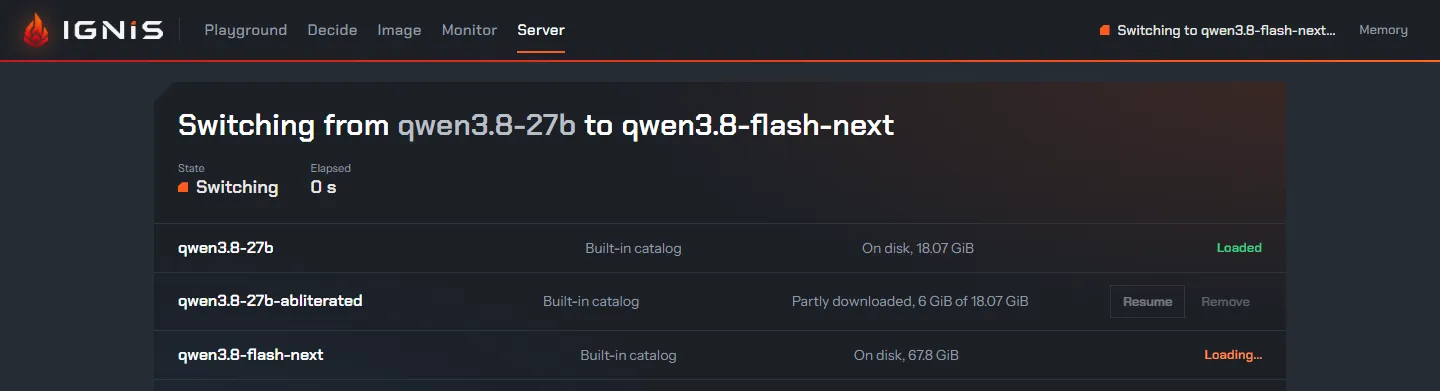
During a switch the band says what is happening and for how long; afterwards
it keeps the outcome: Switched from … to …, or why the switch was refused
or failed and which model serves now. A model the server
unloaded while idle shows as Unloaded, not as an
error; the next message loads it again, and Load does it now. While a chat
reply streams, the band says how long a switch would let it finish
(switch.drain_timeout) before cancelling it.
Downloading a model
Section titled “Downloading a model”Download sends POST /v1/models/download with the entry’s id, and the
server fetches it into its own download.path, whatever machine the browser
runs on, with the same transfer as ignis-server model download: each file
resumed from its .part, checked against its pinned size and SHA-256
(Get a model).
It runs in the background while the loaded model keeps serving. The row then
reads Downloading, <on disk> of <total>, <speed>/s: the page reads
GET /v1/models/catalog every second while a download runs, and the speed is
the bytes landed between those reads. One download runs at a time, so every
other Download and Resume is out of reach until it ends; so is every one during a
switch, or while no model serves.
Once every file verified, the row reads On disk and offers Load: the
server never switches to a model by itself. A partly downloaded entry offers
Resume instead. A download that fails keeps its reason under the row,
Download failed: …, until the entry’s next download or a restart, or until
the entry is on disk whole by another way (ignis-server model download): a row
that reads On disk shows no failure. A gated
repository fails naming the token the server reads from its environment
(IGNIS_DOWNLOAD_TOKEN, or HF_TOKEN for huggingface.co). The page never asks
for a token nor shows one. A refused Download (another one running, the
entry already on disk, downloading turned off) shows the server’s reason in the
band.
Before a byte is written, the server checks that the volume of its
download.path has room for the entry’s bytes still missing plus
download.free_margin (1G by default). Short of room, Download (or a
partial entry’s Resume) is refused, and the reason, naming the bytes needed
and the bytes free, shows under
the row rather than in the band, Download failed: not enough room for …,
until the entry’s next download, a restart, or the entry on disk whole
(Room on the disk).
Free some space there and press it again. download.free_margin is
shown read-only, Set at start, in the Download group.
An entry that ignis-server model download is fetching into the server’s
download.path is refused too, with 409 download_locked naming the command
and its process id, until the command ends: each fetch of an entry holds its
lock, the server’s and the command’s
alike, so two never write the same file
(one writer per entry). Its row
shows no download of the server’s, and any other entry downloads meanwhile.
Downloading takes the same API key as Apply
(ADR 0071).
download.from_ui false turns it off for the page and the API, and
download.enabled false keeps the server off the network altogether; both are
shown read-only, Set at start, in the Download group.
Cancelling and resuming
Section titled “Cancelling and resuming”Cancel on the running row sends POST /v1/models/download/cancel, and the
server stops the download before it answers: the files it verified stay at
their names, and the file it was writing stays as its .part, with every byte
that arrived. The row then reads Partly downloaded, <on disk> of <total> and
offers Resume, which sends POST /v1/models/download again: the server
fetches only what is missing, from the .part on, and checks each file against
its pinned size and SHA-256 before it renames it into place, as for any
download (Get a model).
Cancel stays in reach during a switch, since stopping a download never
touches the loaded model; it is out of reach only while it is being sent or
while the server is not answering, and takes the same API key as Download.
A download cut short by a dropped connection or a restart of the server leaves
a partial entry too, shown the same way. Nothing resumes by itself: after a
restart the entry stays partial until Resume, or ignis-server model download <id> on the server’s machine, continues it. The one exception is the
model the server is started to serve, which a start fetches when it is missing,
as before (Letting the server fetch it).
Removing a model
Section titled “Removing a model”Remove asks first, under the row: Remove <id>? Its files under download.path go, <size>; it can be downloaded again., with its unfinished download included on a partly downloaded entry. When the server started on
that entry’s files, the confirmation also says what the next start does without
it: it downloads it again, asking first on a terminal, or, with
download.enabled false, comes up with no model, on the placeholder template; a
start whose model.artifact names its file refuses to start. When
switch.known_models names the entry’s file, it says a switch to that model is
refused until it is downloaded again. Either is named by the id it is served
under when that is not the entry’s own (The server started on it (as boot)).
Remove there sends POST /v1/models/remove with the id; Keep it sends
nothing.
The server deletes the entry’s files under its download.path, each at its
name and its .part, and answers once they are gone
(Get a model). The
band then says Removed <id>: <size> freed., and the row reads Not downloaded
and offers Download. A file another entry also lists stays while that entry
is on disk or being downloaded, and the band names it, Kept <file>, which <entry> also lists.: the entry removed then reads partly downloaded.
The server refuses, with its reason in the band, the model loaded (also when it
was unloaded while idle, or serves from the entry’s files under another id),
the model a switch or a load is loading, the speech model the speech worker has
loaded (until it unloads it, speech.idle_unload seconds after its last
transcription), and an entry being downloaded, by the server (Cancel it
first) or by ignis-server model download on its machine. The page offers no Remove on the loaded row, the one loading or
the one downloading, and Remove is out of reach while a removal is sent,
during a switch, or while no model serves. A known model that is no catalog
entry is a path the operator gave, and is never removed.
Removing takes the same API key as Apply
(ADR 0071).
download.from_ui false turns it off with downloading, and the page then
offers no Remove. download.enabled false does not: a server kept off the
network still frees its disk.
The configuration
Section titled “The configuration”Scope picks what the form edits: All models (the shared values) or one model family (its own values, which win over the shared ones). The groups (Server, Model, VRAM, Prompt reuse, Model switch, Speculative decoding, Vision, Media, image, Download, N-gram table, KV-disk) are listed on the left; an orange count marks the groups holding a change.
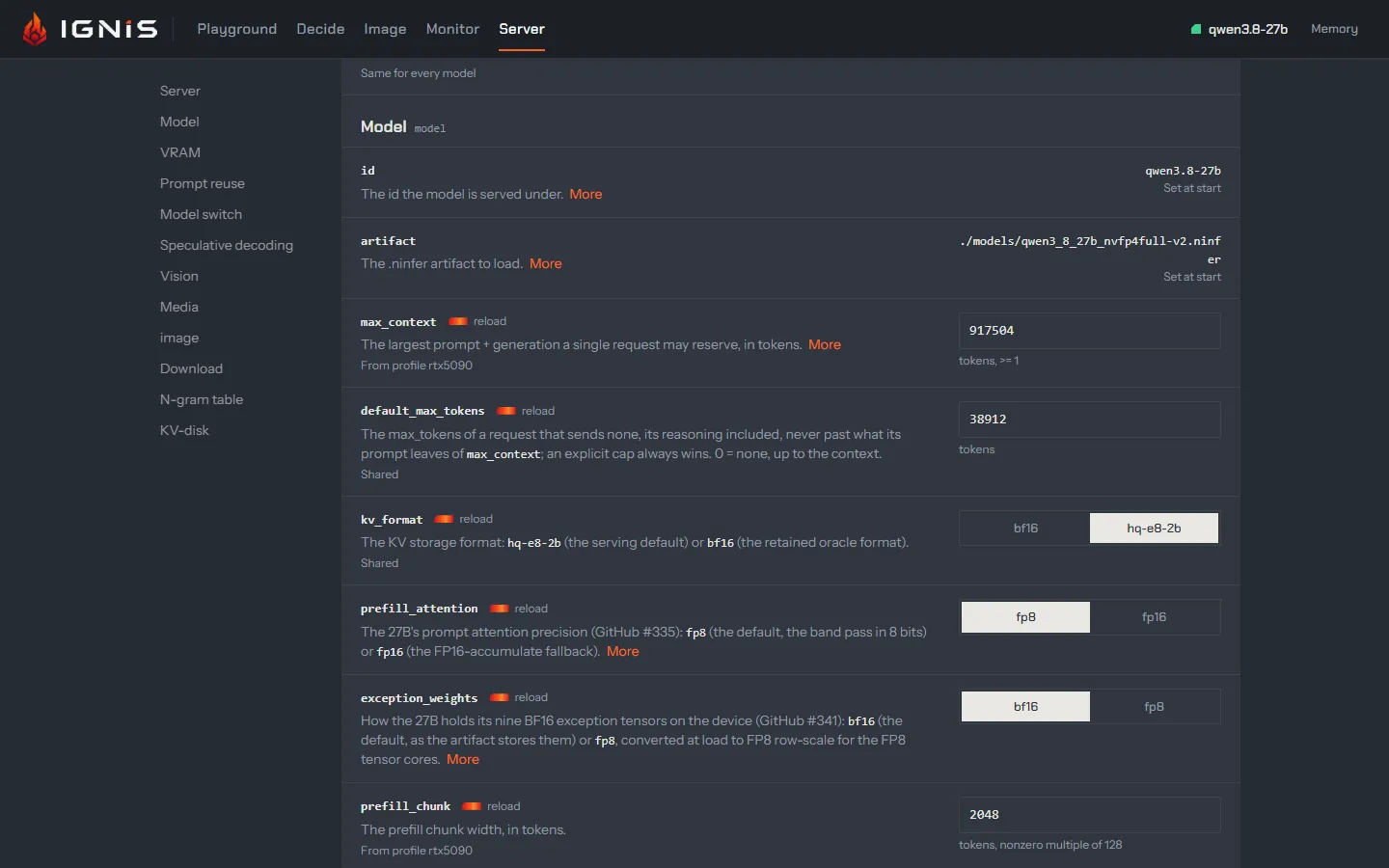
Each row is one field (every field): its
name, the first sentence of its description (More for the rest), and
where its value comes from: From profile rtx5090, Set by IGNIS_MODEL_THINKING_BUDGET (a flag or an environment variable), Shared,
or Own value. A reload mark says a change to it reloads the model. A
field set only at start (the bind address, the API key, the artifact) is shown
read-only, Set at start.
Editing fills a draft and sends nothing. The dock at the foot counts the changes and offers Discard and Apply, which reads Apply and reload <model> when the draft holds a field that reloads it. The label is the confirmation; there is no dialog.
- A live change answers at once:
Applied and written to <path>, the config file in use, or why it was not written. A value a flag or an environment variable would override at the next start is named. - A reload is followed in the model band, then
Reloaded <model> and written to <path>. - A refused value is named by the server; its row is marked
Refused by the server, and nothing was applied.
View as config file shows the configuration in force, live changes
included, as ignis.yaml, to copy or download.
Read more
Section titled “Read more”- Configuration: fields, precedence and profiles.
- Models that come and go: what a switch does and costs.
- Model switching: the same switch from your own code.