
Settings
The right-hand column of the chat holds what the next message is sent with. Nothing here is sent until you send, and nothing is stored: a reload puts the defaults back, apart from the three settings marked stored below. It has two tabs, General and Tools.
General
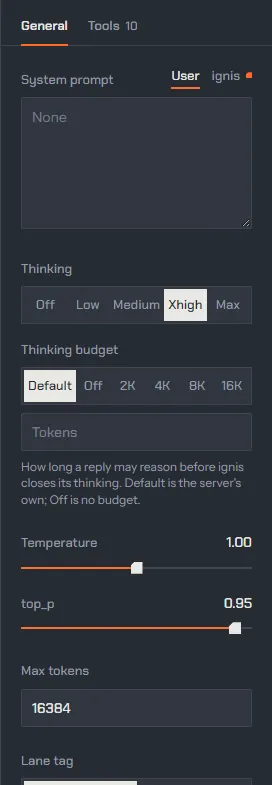
Section titled “General”| Control | Default | What the request carries |
|---|---|---|
System prompt (User tab) |
empty | your text, after the ignis prompt |
System prompt (ignis tab) |
read-only | what the tools that are on write: the date, how to call agents, the web, and so on |
| Thinking: Off, Low, Medium, Xhigh, Max | Xhigh | reasoning_effort: none, low, medium, xhigh, max |
| Thinking budget: Default, Off, 2K, 4K, 8K, 16K, or a number | Default | thinking_budget: nothing for Default, 0 for Off, else the count |
| Temperature | 1.00 | temperature |
| top_p | 0.95 | top_p |
| Max tokens | 16384 | max_tokens (HTTP) or max_output_tokens (WebSocket); empty sends none and the server’s default applies |
| Lane tag: Interactive, Agent | Interactive | class |
| Parallel sessions (stored) | off | nothing: page behaviour |
| Dictation stops after: Off, 2 s, 3 s, 5 s (stored) | 3 s | nothing: the silence the mic’s dictation asks the server to end on |
| Transport: WebSocket, HTTP (stored) | WebSocket | the route the chat uses |
| Markdown in replies | on | nothing: display only |
The system message the server receives is the ignis prompt (what the enabled tools add), a blank line, then yours. It is sent once per session and stays the same from turn to turn, so the server can reuse the whole prompt prefix (prompt reuse).
Thinking and its budget
Section titled “Thinking and its budget”Thinking is how hard the model reasons before it answers; Off answers
straight away, Max reasons without a budget. The thinking budget caps
how many reasoning tokens a reply may spend: past it, the server closes the
reasoning with a sentence that tells the model to answer from what it has
(reasoning). Default is the server’s own
(model.thinking_budget, 32,768), Off is no budget. With Thinking Off the
budget is inert and greyed out; with Max it is ignored. A budget larger than
Max tokens is shortened by the server to leave the answer room, and the panel
says so. When the budget closes a reply, it carries an orange Budget
reached mark and the session log reads reached.
Sampling
Section titled “Sampling”Temperature and top_p go to the server as they are. Temperature 0 needs top_p at 1 (greedy decoding), or the server answers 400; the panel warns in red before you send.
Lane tag
Section titled “Lane tag”Interactive marks the conversation; Agent marks background work that yields first when the engine is short of memory, the class subagents run with. What the tag changes on the server: Lanes that know who is asking.
Dictation
Section titled “Dictation”Dictation stops after is how long a silence ends a dictation by itself, as if you had pressed Done (dictating a prompt). It is the same for every mic on the page: the chat’s, the Image studio’s and Decide’s. A shorter pause cuts nothing, and a held Ctrl+Shift+Space (push to talk) never stops by itself. Off leaves the end to you: Done, a second tap of the shortcut, or letting go of a held one. The choice is kept by this browser, not the server.
Parallel sessions and the transport
Section titled “Parallel sessions and the transport”Off, the page runs one turn at a time across all sessions. On, you can send in one session while another still streams (a session still answers one reply at a time). The WebSocket carries every stream at once and sends only what is new each turn; HTTP opens one connection per stream, and the browser allows five, so the rest wait. The Decide tab uses HTTP either way.
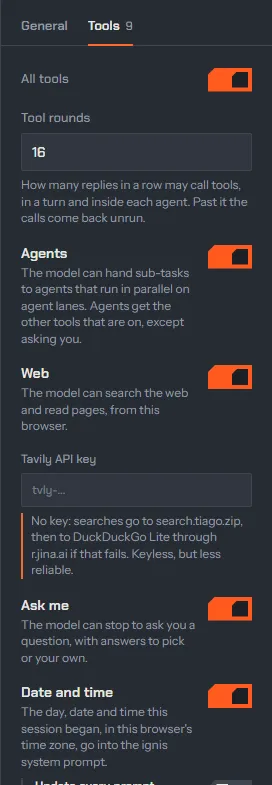
All tools turns the tool set on and off as a whole. While it is on, Tool rounds (16) caps how many replies in a row may call tools, in a turn and inside each agent: past it, the calls come back unrun. Then one switch per tool, each explained in Tools and agents:
| Tool | Default | Extra control |
|---|---|---|
| Agents | on | |
| Web | on | a Tavily API key, kept in this browser |
| Ask me | on | |
| Date and time | on | Update every prompt |
| Run JavaScript | on | Safety check (on) |
| Plan | on | |
| Memory | on | Open memory |
| Workspace | on | |
| Pictures | on |
A tool is declared to the model only while its switch is on, and its
instructions go into the ignis system prompt; the ignis tab of the system
prompt shows the text.
Read more
Section titled “Read more”- Prompting: the server-side defaults behind Default.
- Chat completions: every request field, including the ones the panel does not set (
top_k,seed,stop, penalties).